Independent studio · Dhaka, Bangladesh

Websites and plugins
that hold up
under inspection.

We build WordPress sites with Elementor and Gutenberg, plugins that follow the platform instead of fighting it, and the occasional small SaaS.

Things you can check yourself

  • 2plugins

    reviewed and published on the WordPress.org directory, free and GPL.

    See them on WordPress.org
  • 41checks

    in Accessibility Remediation, each documented — including what it cannot catch.

    What it checks
  • AAWCAG 2.2

    audited on this site before every deploy. A build with one violation does not ship.

    The statement
  • 0trackers

    No analytics, no cookies, no third-party fonts. This page asks nothing of anyone else.

    Privacy notice

01Products

What we ship under our own name

Client work pays for the studio. Products are where we get to decide everything, including what we refuse to do.

Free & open sourcev1.0.4

WOWStudio Accessibility Remediation

It scans your WordPress pages twice, shows every issue on a live preview of the real page, and proposes changes to your own markup that you review before anything is applied. Nothing is added to your front end for your visitors.

  • 41 checks, each documented — including what it cannot catch.
  • Reversible fixes with a preview and a diff. Your content is never overwritten.
  • No outbound requests, no account, no telemetry, no AI.
  • No page limits and no locked buttons. Every check is in the free plugin.
What it doesInstall free

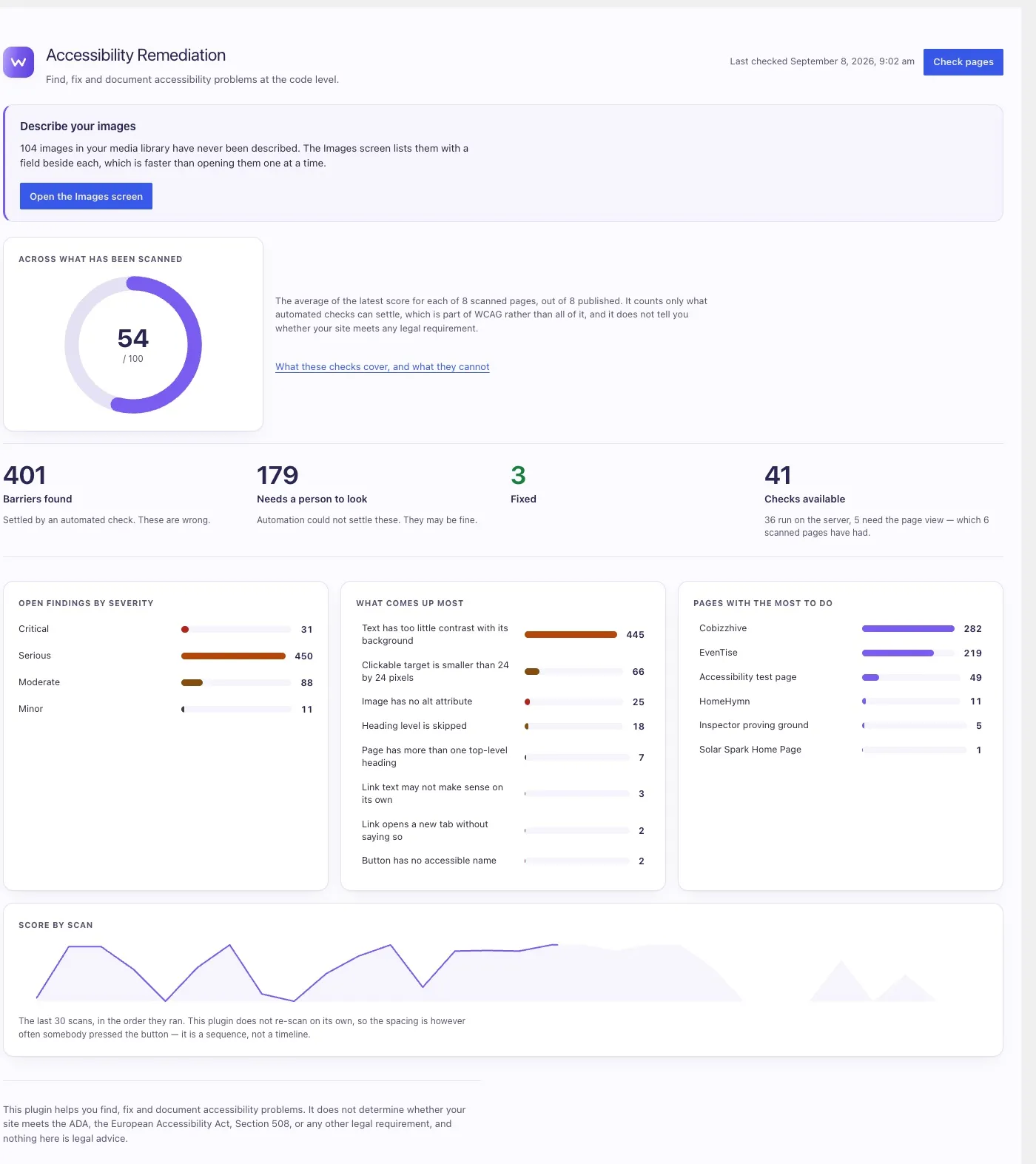
The plugin's report screen. A score of 54 out of 100 sits beside a note explaining that it counts only what automated checks can settle. Below it, four figures — 386 barriers found, 169 needing a person to look, 3 fixed, 41 checks available — then charts of findings by severity, what comes up most, and which pages have the most to do.
The report. Every bar opens the findings behind it.

Free & open sourcev1.0.0

Olmbox

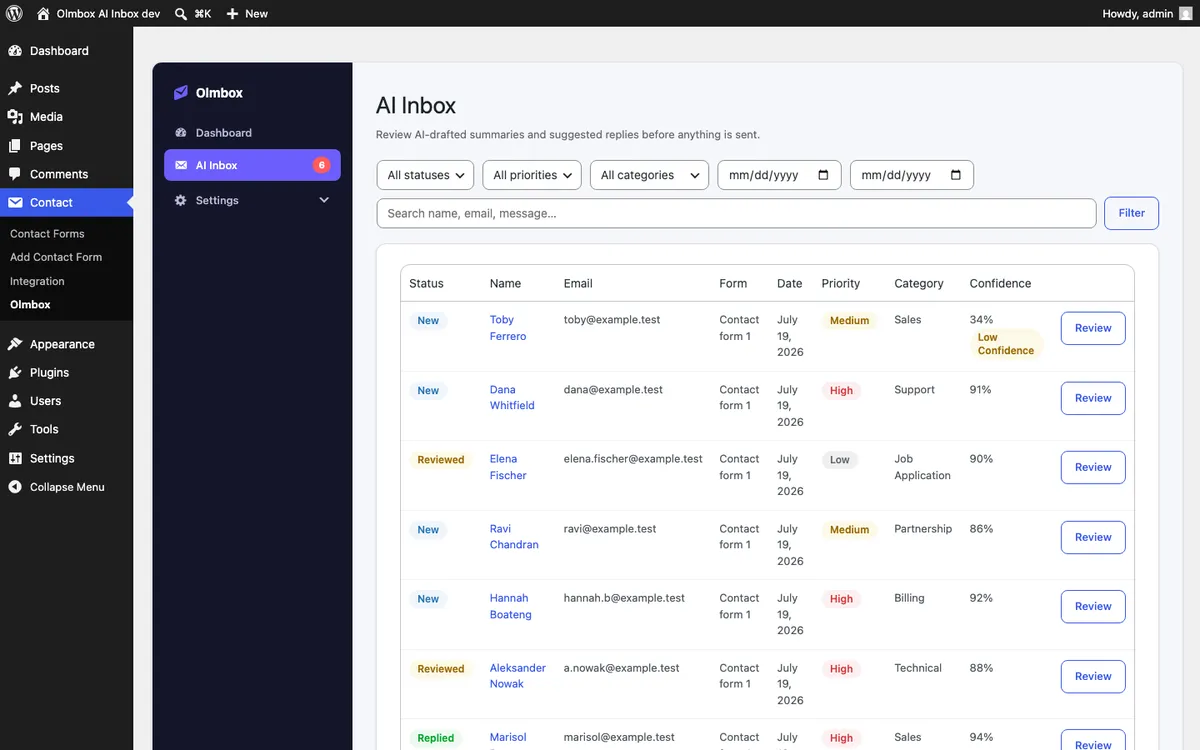
Each submission gets a summary, a suggested reply, a category and a priority, waiting on a review screen beside the original message. You edit what it drafted and decide whether it goes. Nothing is ever emailed automatically.

  • The AI drafts. Nothing leaves your site without a person approving it.
  • A confidence score on every analysis, so you can see when it is guessing.
  • Your own API key — OpenAI, Anthropic, Gemini or OpenRouter — encrypted on your own server.
  • The original message is always kept beside the draft, never replaced by it.

What it doesInstall free

Olmbox's AI Inbox screen in the WordPress admin. A table of form submissions, each row showing a status, the sender, the form it came from, a priority of high, medium or low, a category such as Sales or Support, a confidence percentage, and a Review button. One row is flagged Low Confidence at 34 per cent.
Every submission, triaged and drafted, waiting for a person.

Both are free, both are GPL, and both are on the WordPress.org directory. Need something like them, but yours? We build plugins for clients too.

What both of them have in common

The machine proposes. A person decides.

Accessibility Remediation will not change a line of your markup until you have read the diff. Olmbox will not send an email until you have read the draft. Neither one is automation you have to trust — they are both tools that do the reading and hand you the decision.

02How it runs

No mystery, and no status meetings

Four stages. You can see where a project is at any point without asking for an update.

  1. A brief, then a conversation

    You send four short answers. We read them and reply within one working day, either with questions or with a straight answer about whether we are the right studio for it.

  2. Scope written down

    What is being built, what is not, what it costs and when. If we cannot describe it clearly enough to price it, that is a sign the scope is not ready — and we will say so.

  3. Build, in the open

    Work lands in your repository from the first week. You see progress as commits and working previews, not as a status meeting.

  4. Handover that survives us

    Documentation for the next developer, the accounts in your name, and a walkthrough with whoever has to run it. Then a support window while you settle in.