Free WordPress pluginv1.0.4
Fix the page,
not the symptom.
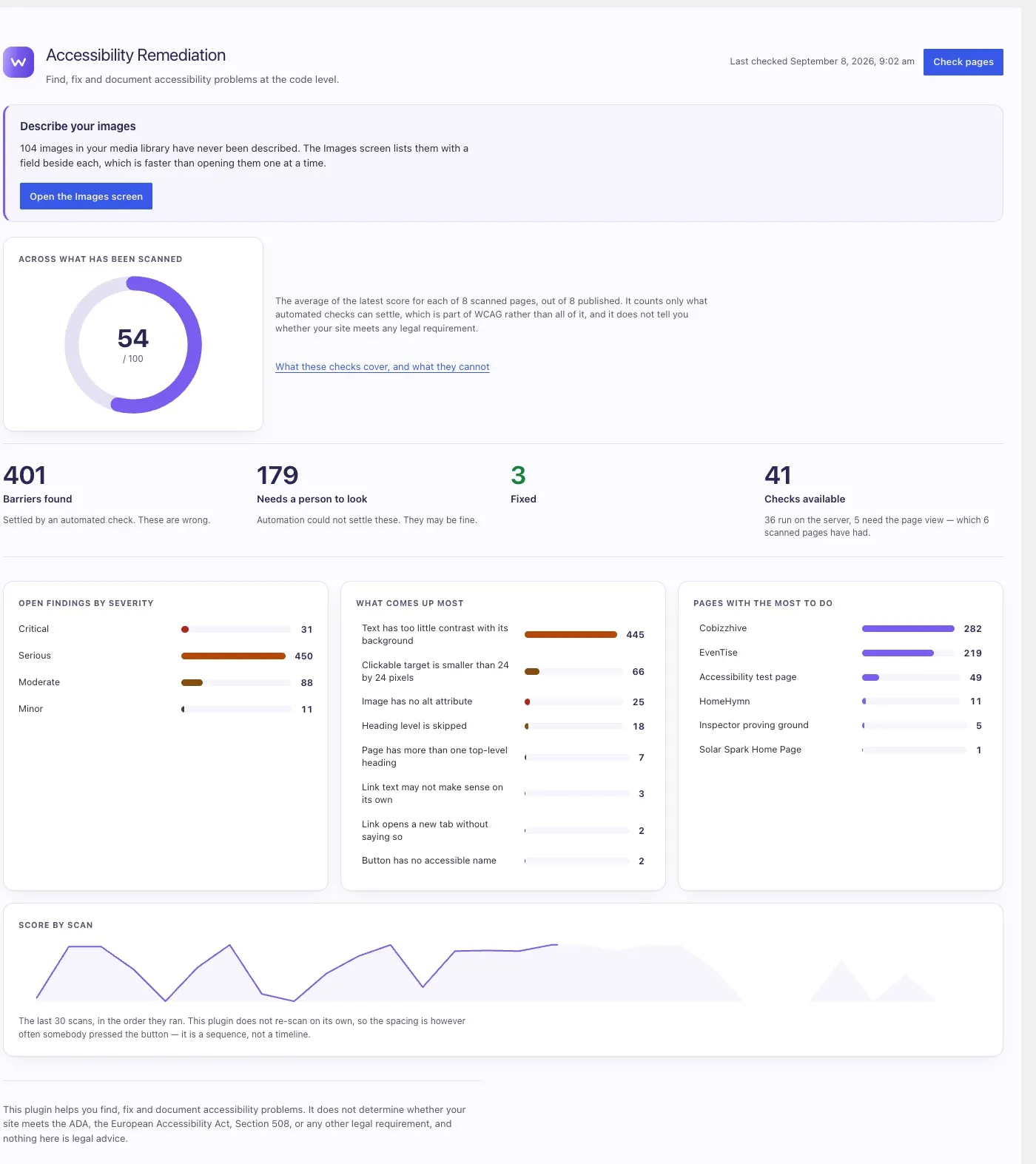
Accessibility Remediation scans your WordPress pages against WCAG 2.2, shows every issue on a live preview of the real page, and proposes changes to your own markup that you review before anything is applied. Nothing is added to your front end for your visitors.
- WordPress
- 6.8 or newer
- PHP
- 8.1 or newer
- Licence
- GPL‑2.0‑or‑later
- Outbound requests
- None
An overlay hides the problem.
This one fixes it.
There is a whole category of plugin that drops a script onto your site and layers a widget over the top. It changes nothing underneath. We do not build those.
A widget on a broken page
- Injects a script into your front end for every visitor.
- Leaves the underlying markup exactly as it was.
- Widely criticised by the disabled people it claims to serve.
- Has drawn regulatory action.
- Stops working the moment you remove it.
Real fixes in your own code
- Nothing is added to your front end. Ever.
- Changes go into your markup and your own Additional CSS.
- Every change is previewed, diffed and reviewed by you first.
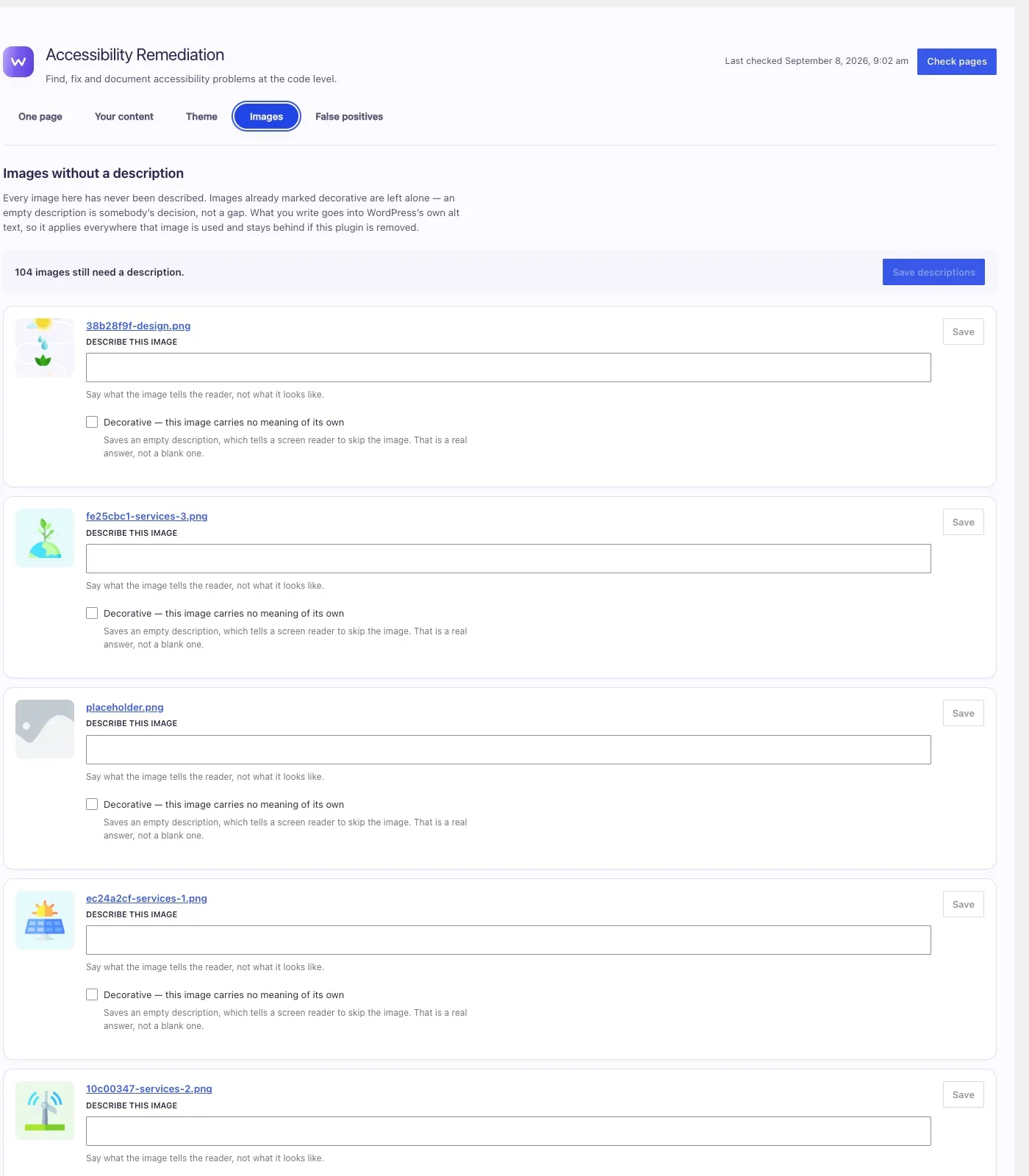
- Alt text is written to WordPress’s own field.
- Remove the plugin and your fixes stay behind.
From “what’s wrong” to “fixed, and written down”
- 01
Scan, twice
A server-side pass reads the rendered HTML against a registry of WCAG rules. A second pass runs in your browser, on the page as it was actually painted, for the things no parser can know: real contrast, real target sizes, real layout.
- 02
See it on the page it came from
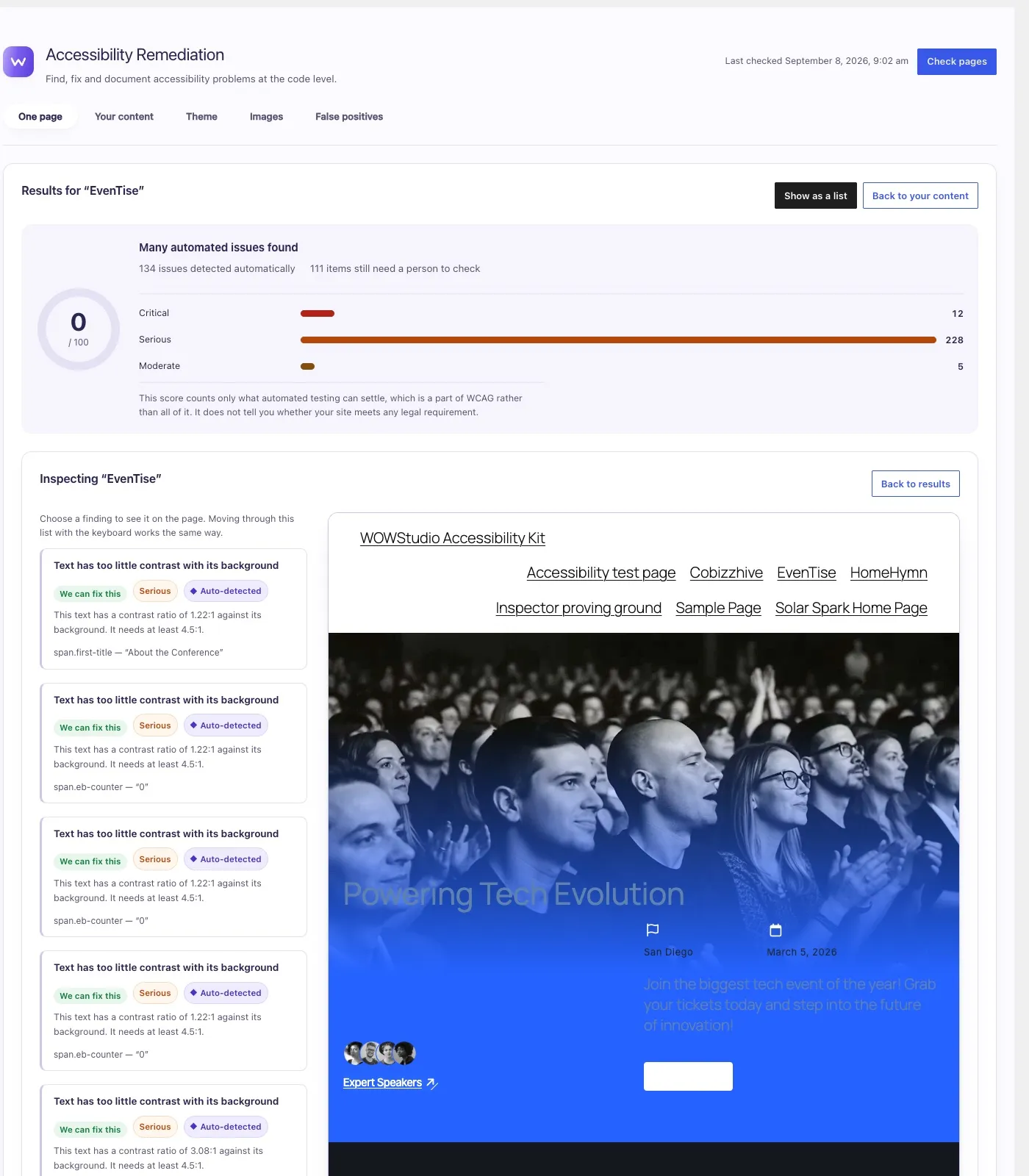
The inspector puts findings beside a live preview. Choosing one highlights the element it is about, so you are never guessing which paragraph or which button.
- 03
Understand what you are looking at
Every issue carries its WCAG success criterion and severity, and is labelled either auto-detected or needs manual review. Findings name themselves in readable terms rather than a long DOM path.
- 04
Fix it, reversibly
Markup fixes are shown as a preview and a diff, then stored in an override layer that never overwrites your content. Styling problems get a rule written into your own Additional CSS, where you can read, edit or delete it without this plugin.
- 05
Check the fix actually worked
After a style rule is applied the page is loaded and measured again. If your theme outranked the rule you are told that, rather than being told it is fixed.
- 06
Write it down
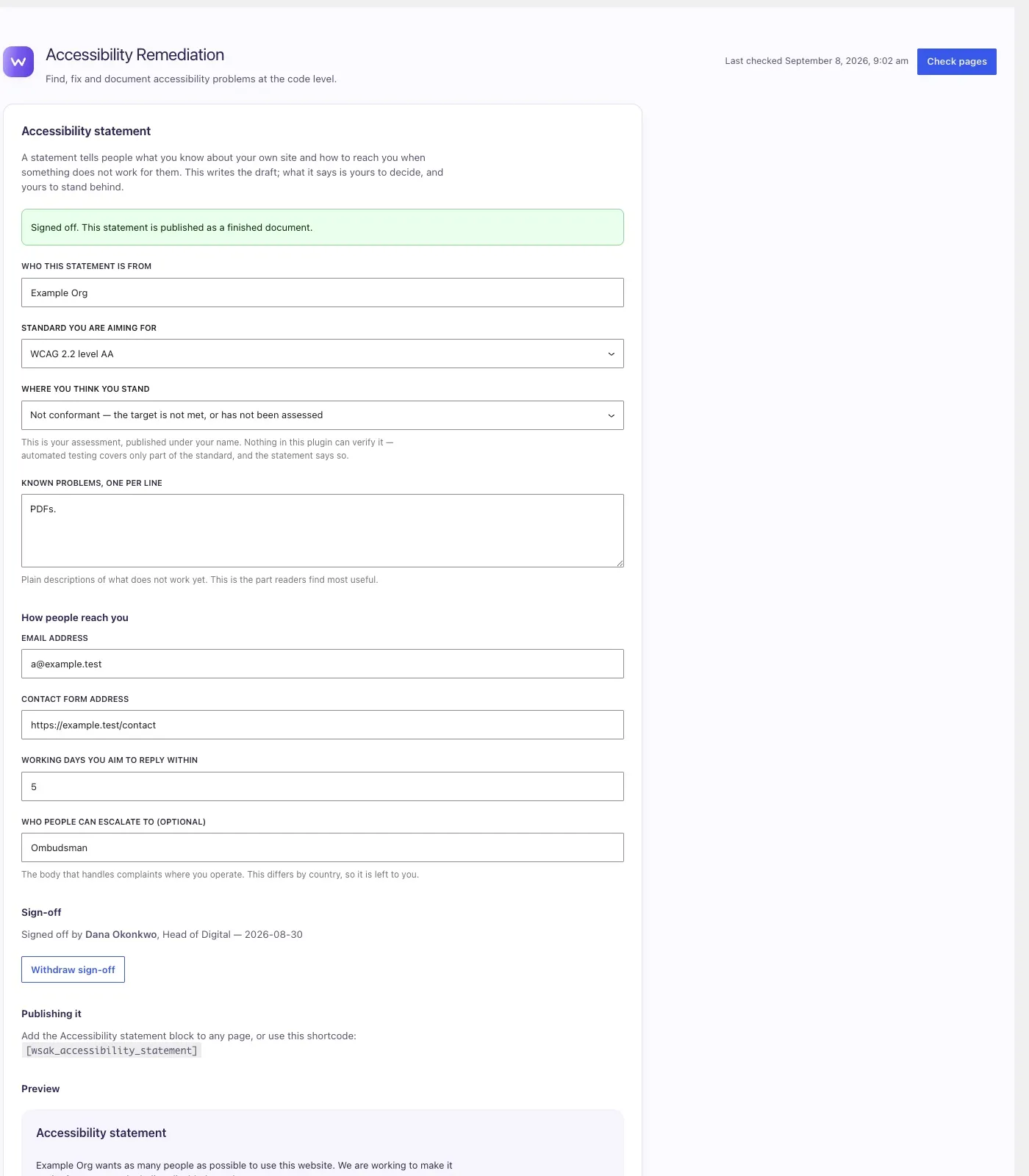
Generate an accessibility statement you review, edit and attest to, including the feedback contact mechanism European rules expect. The plugin never asserts conformance on your behalf.
A complete toolkit — every part of it free
Everything below is in the plugin you install. Nothing here is a locked button or an upgrade prompt, and the paid add-on further down takes none of it away.
41 checks
36 run on the server, 5 need the rendered page. Every one is documented, including what it cannot catch.
Live inspector
Findings beside a real preview, one open at a time, arrow keys to move between them.
Reversible fixes
Stored in an override layer with a preview, a diff and an undo. Your content is never overwritten.
CSS fixes in your CSS
Style corrections go into Additional CSS, weighted to outrank what is already there — and they say so when nothing can.
Bulk alt-text editor
Every undescribed image in one list with a field beside each. It writes to WordPress’s own alt text field, so it stays behind if you remove the plugin.
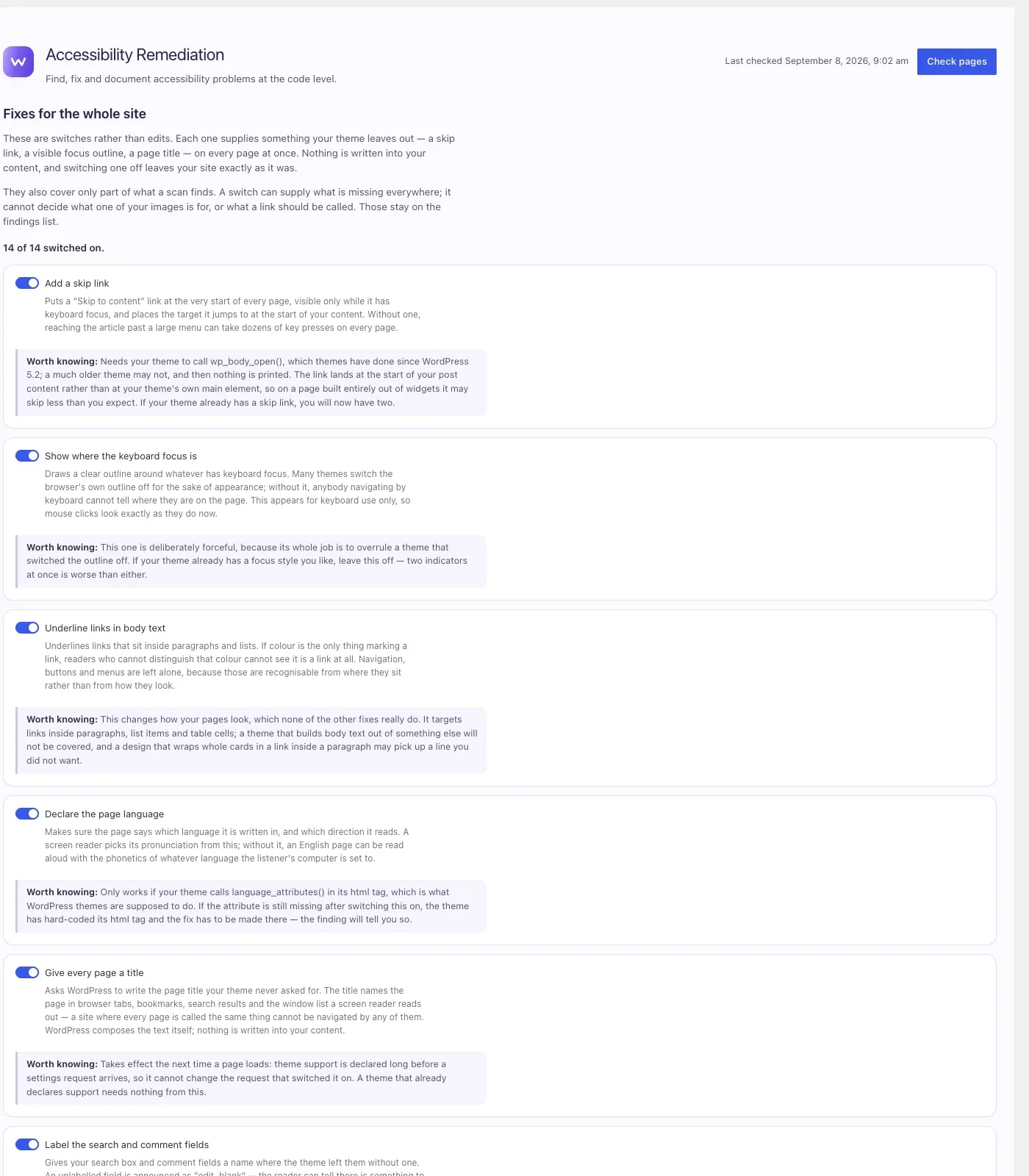
Site-wide fixes
Switches that supply what a theme leaves out: a skip link, a visible focus outline, a page title. Each says what it might disturb before you turn it on.
Whole-site runs
Check every post and page in one background job. No page limit, because nothing is metered.
Repeated faults, judged once
A fault your theme repeats on every page is grouped by the markup behind it and settled once, with a reason on the record.
Reading-level check
Pages measured against Flesch–Kincaid, with somewhere to add a plain-language summary where the text is heavy going.
We tell you what a machine cannot check
Automated testing can only ever settle part of WCAG. Meaningful sequence, focus order, whether your alt text is actually accurate — those need a person.
It separates barriers a check settled from findings that need someone to look, and documents the coverage of all 41 checks in a panel you can read at any time. It will never report your site as compliant, because no plugin can.
It does not determine or certify compliance with the ADA, the European Accessibility Act, Section 508, AODA, the UK Equality Act, or any other law. It is a tool for doing the work and keeping a record of it. It is not legal advice, and it is not a substitute for testing with disabled users.
Nothing about your site leaves your site.
The free plugin contacts nothing
- No API, no account, no telemetry, no phone-home.
- The scanner, the fixes, the alt-text screen, the statement and the reports all run on your own server.
- It works the same whether or not your server can reach the internet.
- No AI. Nothing is generated and nothing is sent.
The add-on contacts exactly one service
- Freemius, which runs the store, to check the site holds a licence. Nothing about your content or your findings goes with it.
- Email digests go through your own site’s mail, to addresses you type in.
- Webhooks go to URLs you type in. Addresses inside your own network are refused.
- Crawling fetches pages from your own site and never leaves it.
No finding, no page and no content is ever sent to WOWStudio.
Priced by how many sites
it looks after
One add-on, one set of features. The only thing that changes between tiers is the number of sites your licence activates on — nothing is gated by plan.
Single site
One site you own and look after.
$11.99a month
$143.88 billed once a year.
Start a 7-day trial of the Single site tieror $14.99 a month for the Single site tier, billed monthly — paying annually saves 20%
5 sites
A small portfolio, or a studio with a handful of clients.
$55.99a month
$671.88 billed once a year.
Start a 7-day trial of the 5 sites tieror $69.99 a month for the 5 sites tier, billed monthly — paying annually saves 20%
10 sites
A growing book of client sites.
$111.99a month
$1,343.88 billed once a year.
Start a 7-day trial of the 10 sites tieror $139.99 a month for the 10 sites tier, billed monthly — paying annually saves 20%
20 sites
Lowest price per siteFor agencies looking after client sites at volume.
$199.99a month
$2,399.88 billed once a year.
Start a 7-day trial of the 20 sites tieror $249.99 a month for the 20 sites tier, billed monthly — paying annually saves 20%
- The trial
- 7 days on any tier. Card details are taken at checkout, nothing is charged until the trial ends, and you are emailed two days before it does.
- Refunds
- Freemius offers a 14-day satisfaction guarantee, shown at checkout.
- Annual or monthly
- Both, on every tier. Paying for the year costs 20% less than paying month to month, and you can switch later.
- Best value per site
- The 20 sites tier, at $119.99 per site per year.
- What you need
- The free plugin, installed and active. Premium is an add-on and will not run without it.
- The free plugin
- Stays free, stays complete, and keeps working whether or not you ever buy this.
Prices are in US dollars. Checkout, invoices and subscriptions are handled by Freemius, our reseller and merchant of record. Bigger than 20 sites? Tell us what you are looking after.
The things people ask first
Will this make my site compliant?
No, and be careful of any tool that says it will. Conformance is a property of your site and your organisation’s practices, not something a plugin can confer. This plugin helps you find issues, fix them properly, document what you did, and notice when something regresses. The rest — manual testing, testing with disabled users, editorial judgement — is yours.
Is this an accessibility overlay?
No. Overlays layer a script over your site at run time. They are widely criticised by disabled users and have drawn regulatory action. This plugin changes the underlying markup instead and adds nothing to your front end for visitors.
Can I undo a fix?
Yes. Fixes live in a reversible override layer rather than being written over your content, and each one can be reverted.
Does it use AI?
No. Nothing here is generated and nothing is sent anywhere. Where an answer depends on what your content means — what an image is for, what a link promises — the plugin says so and gives you the fastest way to write it yourself, rather than producing a plausible sentence and leaving you to notice it is wrong.
Is any of it paid?
The plugin is free, and every part of it stays free — all 41 checks, every severity, the fixes, the alt-text editor and the whole-site scan. There are no locked buttons and no upgrade prompts inside it. There is a separate paid add-on, Premium, which re-checks your site on a schedule and tells you when something regresses. You install it alongside the free plugin, and nothing is taken away from the free plugin if you never do.
Does the free plugin stop working without a licence?
No. They are two separate plugins and the add-on cannot reach inside the free one. Without a licence the scheduled scans, alerts, crawling and client report switch off, every screen stays where it is and explains what is off, and the free plugin carries on exactly as before.
What happens when a licence lapses?
The scheduled work is cancelled rather than left running at a hook nothing listens to. A site that quietly stopped being re-checked while its owner believed it was being watched is the failure that feature exists to prevent.
Does the add-on send you my content?
No finding, no page and no content is ever sent to WOWStudio. The add-on contacts one external service, Freemius, and only to verify the site holds a licence. Email digests go through your own site’s mail to addresses you type in, webhooks go to URLs you type in, and crawling only ever fetches pages from your own site.
What is the difference between the plans?
How many sites the licence activates on, and nothing else. Every tier gets the same add-on with the same features — the plugin does not gate anything by plan.
Where is the alt text saved?
In WordPress’s own alt text field on the media item. It applies everywhere that image is used, works with every theme, and stays behind if you remove this plugin.
Find what is actually broken.
Then keep it fixed.
Start with the free plugin. Add the scheduled re-checking when you have something worth protecting.
Read the documentation · Changelog
Building something that needs this level of care? That is what we do for clients too.