In a browser
Check one page without an account
Paste an address, get the whole report for that page — issues, fixes, prompts, the lot. Signing up adds whole-site audits, scheduled rescans, PDFs and share links for developers.
Live, free to tryWeb app
AccessibilityBrief checks a website against WCAG 2.2 and hands back the exact fix for every issue it finds: the steps, the code before and after, a note for your platform, and a prompt for your AI assistant. One page is free, with the whole report and no account.
It is ours. Built, run and paid for by this studio.
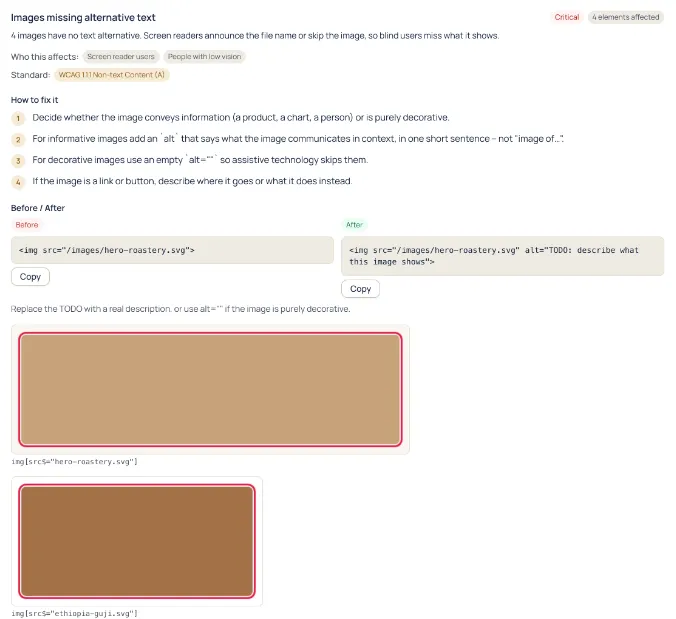
Every tool can produce one. What you need next is what to change, where, and whether it is yours to change at all. Here is everything that arrives with a single issue.
Not the rule number first. "Four images have no text alternative. Screen readers announce the file name or skip the image, so blind visitors miss what it shows."
Screen reader users, people with low vision, keyboard-only users, people who need large targets. Severity follows from that, not from a scoring curve.
The WCAG 2.2 success criterion and its level, linked to the W3C page — so an argument about whether it matters can be settled by reading.
Numbered, in plain language, including the case where the right answer is an empty alt because the image is decorative.
Your actual markup on the left, the corrected markup on the right, with the selector and the page it came from. Copy either one.
The same change written as an instruction for ChatGPT, Claude, Cursor, Copilot or whatever is in your editor, with the selectors and the rule already in it.
The same issue, as code
<img src="/images/hero-roastery.svg"><img src="/images/hero-roastery.svg"
alt="TODO: describe what this image shows">It writes TODO on purpose. Only you know what that image is there to say, and a tool that invents the sentence for you has replaced one accessibility problem with a quieter one.
The report is the same everywhere. What changes is who is reading it — you, a build, or the assistant writing the patch.
In a browser
Paste an address, get the whole report for that page — issues, fixes, prompts, the lot. Signing up adds whole-site audits, scheduled rescans, PDFs and share links for developers.
In your terminal
Scan from your machine or from a deploy script, with an exit code you can gate on. Fail the build when something serious appears, or when the score drops.
In CI
One step in a workflow. The job summary gets a table of what was found, and the job fails on the severity you choose, so a regression is caught before it is live.
In an agent
Claude Code, Cursor and anything else that speaks MCP can start a scan, read the issue groups and ask for the fix prompt — so the agent fixing your site is reading the real report rather than guessing.
Scan from anywhere that has Node
npx accessibilitybrief scan https://example.com --fail-on seriousExit code 0 passed, 1 the gate failed, 2 something went wrong — so a pipeline can act on it. The GitHub Action is the same scan as one workflow step, and the MCP server puts the same report inside Claude Code or Cursor.
Every issue carries its WCAG 2.2 criterion, and the report shows which of the laws that refer to WCAG concern the issues it found.
Dates and scope change. If a deadline matters to your business, read the law rather than a marketing page — including this one.
No automated tool can settle conformance, and the ones that say otherwise are selling certainty rather than testing.
The score counts only what software can decide, and says so on the page it is printed on. Everything a machine cannot judge — whether the alt text is true, whether the focus order follows the page, whether an error message helps anyone — is listed as a manual check with instructions, instead of being quietly left out so the number looks better.
That is the same reason this site is audited against WCAG 2.2 AA on every deploy, and the same reason a build with one violation in it does not ship.
No, and it is the opposite of one. Nothing is added to your website — no script, no widget, no button in the corner. AccessibilityBrief loads your page the way a visitor would, reports what it found, and hands you the change to make in your own source. If a product asks you to paste a script tag in exchange for accessibility, that is an overlay, whatever the sales page calls it.
Part of it, and nobody can honestly give you a single number — it depends on the site and on how you count. What is safe to say is that whole classes of problem are out of reach of any automated tool: whether alt text says the right thing, whether the focus order follows the page, whether a custom component behaves the way a screen reader user expects. The report says so on the page rather than in a footnote, and a manual checklist comes with it.
It will not, because no tool can. Conformance is a claim you make about your own site, and it rests on testing a machine cannot do. What you get is a score built only from issues software can settle, labelled as exactly that, plus the evidence behind every number.
One page is free with the full report and no account. Paid plans start at $19 — a one-off audit of up to 300 pages, or a monthly plan that adds scheduled rescans, more sites, team seats, the API and white-label reports. Prices are on the AccessibilityBrief site; nothing is sold or charged here.
Different job, same principle. AccessibilityBrief checks any website from outside and tells you what to change. Accessibility Remediation lives inside WordPress and makes the change for you, reversibly, after you have read the diff. If your site is WordPress, the plugin is free and does more. If it is not, or if you want whole-site audits, scheduled rescans and CI, this is the one.
We did — the same studio that writes this site. It runs on Next.js, PostgreSQL, Playwright and axe-core, and it is the reason the accessibility work we sell as a service is not theory.
Check a page freeOr have us fix it
Running WordPress? Accessibility Remediation does the same job inside the admin, free, and applies the fix for you once you have read the diff.